
How survey design works
Survey design in Survanta brings the structure, questions, rules, and respondent experience into one coherent definition. A well-structured survey helps field teams follow the intended flow and helps the organization receive responses that are easier to review and analyze.
Authoring takes place in the Survey Builder. It is an integrated workspace with an outline, editing areas, review information, previews, and focused panels or dialogs for particular actions.
Open the Survey Builder guide for a detailed tour of that workspace.
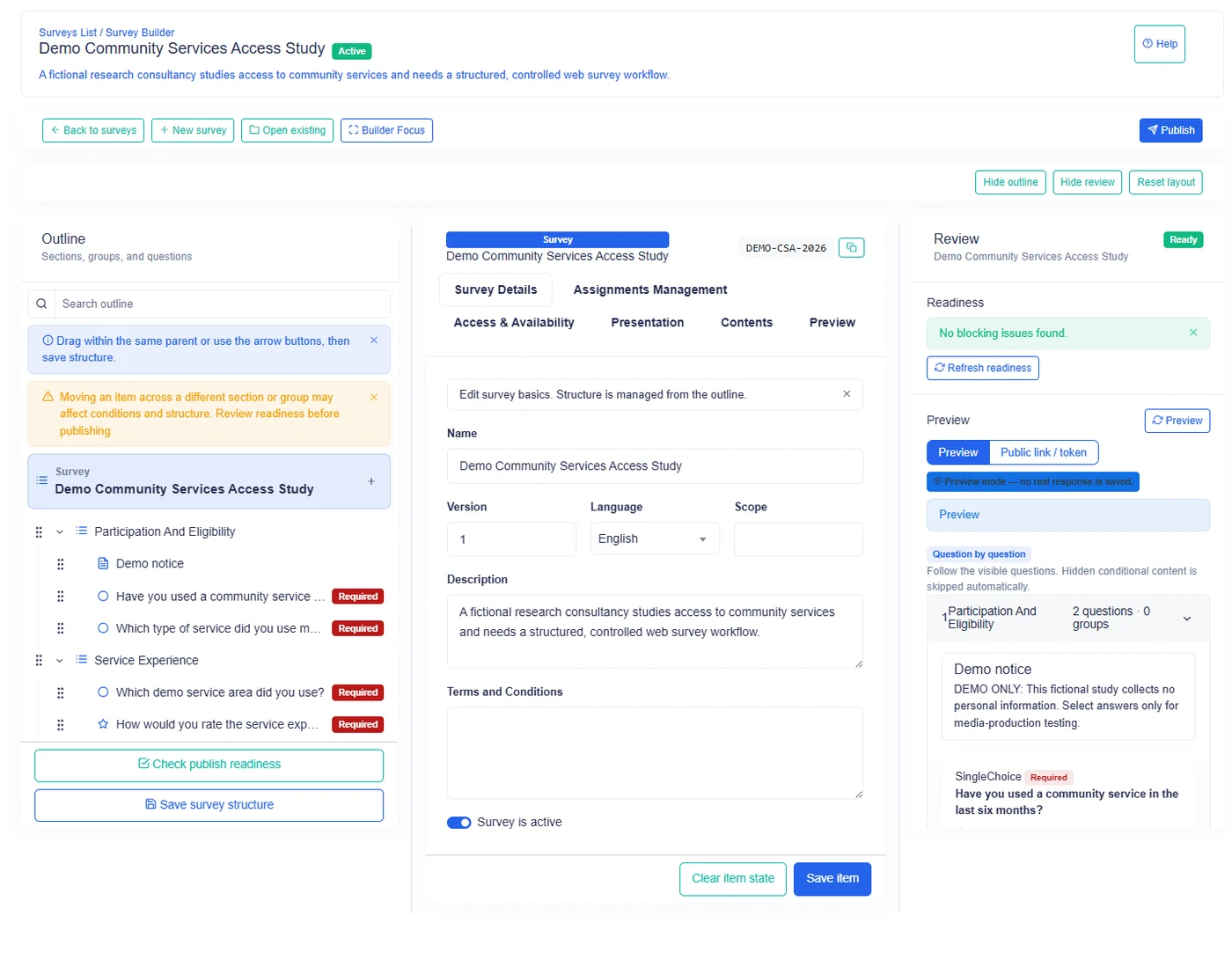
The design hierarchy
A survey is assembled from several building blocks.
| Building block | Purpose | Typical example |
|---|---|---|
| Survey | Holds the complete questionnaire and its collection settings | Household baseline survey |
| Section | Divides the survey into major topics or stages | Household profile |
| Group | Keeps related questions together inside a section | Primary caregiver details |
| Question | Captures one answer | Number of household members |
| Dynamic table | Captures several structured records as rows | Household assets |
The hierarchy matters because rules can apply to one item or to a larger block. Hiding a section, for example, also removes its contained questions from the respondent's active path.
Sections organize the journey
Use sections for major topics, interview stages, or responsibility boundaries. A clear section sequence helps respondents understand where they are and lets authors place related groups, questions, and tables together.
Useful section boundaries include:
- consent and identification;
- household composition;
- services and outcomes;
- observations and attachments;
- closing checks.
Avoid creating a section for every question. Sections work better as meaningful chapters.
Groups keep related questions together
A group collects questions that describe one subject. For example, a group named "Dwelling details" may contain questions about occupancy, construction material, and water source.
Groups become especially useful when the whole set must repeat. If a household has five members, a member group can appear five times so that every member receives the same set of questions.
Questions capture individual answers
Survanta provides 13 question types for text, numbers, choices, dates, durations, files, ratings, and managed lookups. Choosing the type is a data-design decision, not only a visual choice.
Use an Integer question for a count that may drive repetition. Use a Decimal question for measured values that may contain fractions. Use a lookup when the answer must come from a managed dataset shared across surveys.
Dynamic tables capture row-based records
A dynamic table is suited to several records that share the same columns. An asset register, visit log, or list of findings can be represented as rows instead of repeating a long group of questions.
The author defines the columns and row rules. The respondent then works within those rules by filling, adding, or removing rows where permitted.
Learn how dynamic tables work.
Validation protects answer quality
Validation rules describe what a valid answer looks like. They can make an answer required, bound the length of text, limit numeric values, control decimal precision, constrain dates, or restrict file uploads.
Validation should reflect the real research protocol. A narrow rule can reject a legitimate answer, while an overly broad rule may allow data that requires substantial cleaning later.
Review the validation reference.
Conditions adapt the respondent path
A condition observes a source question, compares its answer with a value, and applies an action to a target. The target can be a question, group, section, or dynamic table.
Conditions can:
- show content;
- hide content;
- make applicable content required;
- determine how many occurrences appear;
- disable content.
This lets one survey support different respondent situations without asking everyone every question.
Repetition is part of conditions
Repetition is not a separate survey object. It is an action in the conditions system, paired with a cardinality operator that decides the number of occurrences.
Two operators repeat content:
- Fixed Count: the author states the number.
- Count From Answer: a respondent's whole-number answer states the number.
The repeat target can be one question, one group, or one dynamic table block. The platform allows up to 20 occurrences and does not support nested repetition.
Understand Fixed Count and Count From Answer.
Table row count is a different cardinality mode
Dynamic Table Row Count Control also belongs to the conditions system, but it does not create several table blocks. It creates one table whose number of rows comes from a whole-number answer.
This distinction affects both the respondent experience and the shape of the resulting data.
Control table rows from an answer.
From design to collection
Surveys are designed on the web. Once the survey is ready for its intended audience, responses can be collected through supported web experiences or through the mobile app.
Collection context matters:
- public link and QR collection is online-only;
- signed-in field users can use mobile offline collection where supported;
- editing an already-submitted response is online-only;
- the mobile app currently uses a light theme.
For mobile collection behavior, see Mobile app overview and Offline work and synchronization.
A practical design sequence
- Define the survey purpose, audience, language, and collection channel.
- Divide the questionnaire into meaningful sections.
- Group questions that describe the same subject.
- Choose the question type that matches each answer.
- Add dynamic tables for row-based records.
- Add validation that reflects the protocol.
- Add conditions only after the base flow is understandable.
- Add repetition where the number of subjects or records varies.
- Preview the respondent flow and test boundary values.
- Review the survey in every collection channel the organization plans to use.
Design the simplest unconditional path first. Add branches and repetition after the underlying questions and targets have clear names and stable positions.