
Repeating content: Fixed Count and Count From Answer
Repetition creates several occurrences of the same survey content without requiring the author to duplicate the definition. It is useful when the number of people, visits, facilities, events, or record blocks varies.
In Survanta, repetition is part of the conditions system. The author selects the Repetition action and pairs it with a cardinality operator that determines the count.
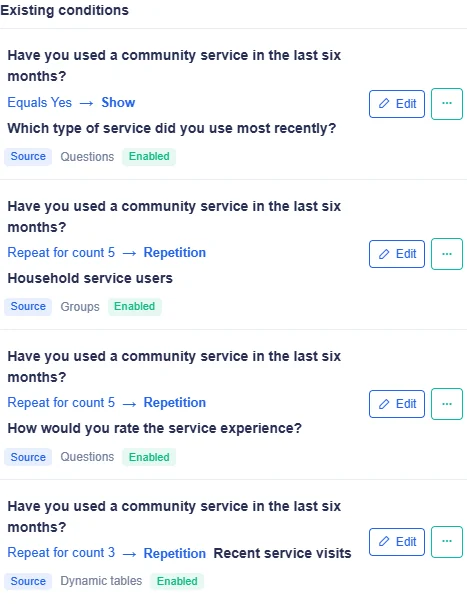
Household survey example
Consider a household survey that asks:
How many household members live here?
The answer is an Integer. If the respondent enters 5, a member-details group can appear five times. Each
occurrence contains the same questions, such as name, age, relationship, and school attendance, but each
occurrence stores its own answers.
The design has two parts:
- an Integer source question that captures the member count;
- a Repetition condition that applies Count From Answer to the member-details group.
Two ways to determine the count
| Mode | Who determines the count? | Does the source answer override it? | Typical use |
|---|---|---|---|
| Fixed Count | Survey author | No | Always collect three observations |
| Count From Answer | Respondent through an Integer answer | Yes | One occurrence per household member |
Both modes can target a question, a group, or a dynamic table block. Both are limited to a maximum of 20 occurrences.
One active count rule per target
A question, group, or dynamic table can have one active count rule. The Survey Builder rejects a second Fixed Count, Count From Answer, or Row Count Control rule for the same target.
If different conditions appear to require different counts, redesign the source question so one count rule has a clear authority.
Fixed Count
Fixed Count means the author enters the number of occurrences in the condition definition.
If the author sets the count to 3, respondents see three occurrences whenever that repeated target is active.
An answer to the condition's source question does not replace or change the authored number.
Fixed Count uses the value set by the author. The respondent cannot override it by entering another number.
When to use Fixed Count
Use it when the protocol prescribes a known number of repetitions:
- three observation rounds;
- two required contact attempts;
- four seasonal measurements;
- one block for each fixed study phase.
Do not use Fixed Count when the count genuinely depends on the respondent's situation.
Fixed Count behavior
0means the repeated content does not appear.- positive whole numbers create that many occurrences.
- the count cannot exceed 20.
- any smaller target-specific maximum also applies.
- the source answer is not consulted for the count.
Count From Answer
Count From Answer reads the respondent's answer to an Integer source question and uses that whole number as the number of occurrences.
If the household member count is 5, the target appears five times. If the respondent changes it to 3, the
active target changes to three occurrences.
Source requirements
The source must:
- be an Integer question;
- belong to the same survey;
- provide a whole-number answer;
- not itself be inside repetition that creates a dependency conflict.
A Decimal, Text, Rating, or other question type cannot be used as a Count From Answer source.
Optional blank source
If the Integer source is optional and remains blank, the resolved count is 0. The repeated content does not
appear.
If the source itself is required, normal required-answer validation asks the respondent to answer it.
Zero
A source answer of 0 is valid cardinality. It means there are no occurrences, so the target does not appear.
This is useful for genuine none cases, such as a household with no children in the age group being studied.
Maximum
The global maximum is 20 occurrences. A target can also have a smaller maximum, in which case the smaller limit applies.
The respondent receives a validation message if the answer exceeds the applicable limit. Survanta does not silently round or reduce an invalid count.
What happens when the source changes
The respondent interface recalculates repetition when the source answer changes.
If a count rises, new blank occurrences are added. If it falls, occurrences above the new count leave the active form.
During the current form session, Survanta temporarily retains those removed occurrence controls. If the count is raised again before the form is saved or left, the earlier entered values can reappear in their occurrence positions.
Only occurrences within the final active count are submitted. Do not rely on temporarily removed values after leaving or completing the form.
Example:
- The respondent enters
4household members. - Four member groups appear and are filled.
- The count is corrected to
2. - Occurrences 3 and 4 leave the active form.
- If the count returns to
4in the same session, their entered controls can return. - If the response is submitted with count
2, only the two active occurrences belong to that final submission.
The three repeat targets
Repetition can target:
- one Question;
- one Group;
- one Dynamic Table block.
The target changes what one occurrence contains. A group occurrence includes every question in that group. A dynamic table block occurrence is a separate table with its own rows.
For a Group target, set the group's minimum count to 0 before adding cardinality control.
Compare the three repetition targets.
Repeating a table block is not row count control
These are different cardinality operators:
- Dynamic table block repetition: creates several separate table blocks.
- Dynamic Table Row Count Control: creates one table and sets its number of rows from an Integer answer.
For example, block repetition of 3 creates three separate tables. Row count 3 creates one table with three
rows.
Nested repetition is not supported
Survanta does not support a repeated target inside another repeated target. For example, a question with its own repetition cannot sit inside a group that is also controlled by repetition.
The Survey Builder prevents that design. Repeat the group or repeat the question, not both.
This limitation prevents answers from having two ambiguous occurrence dimensions.
Authoring workflow
- Create and label the target content; if it is a Group, set its minimum count to
0. - For Count From Answer, create an Integer source question before the target.
- Open the target's condition settings.
- Choose the Repetition action.
- Choose Fixed Count or Count From Answer.
- Enter the fixed value or select the Integer source.
- Confirm no other active count rule controls the target and that the count does not exceed 20 or a smaller target maximum.
- Preview counts
0,1, the expected common value, and the maximum. - Reduce a count after entering answers and test the result.
- Review the stored response and export shape.
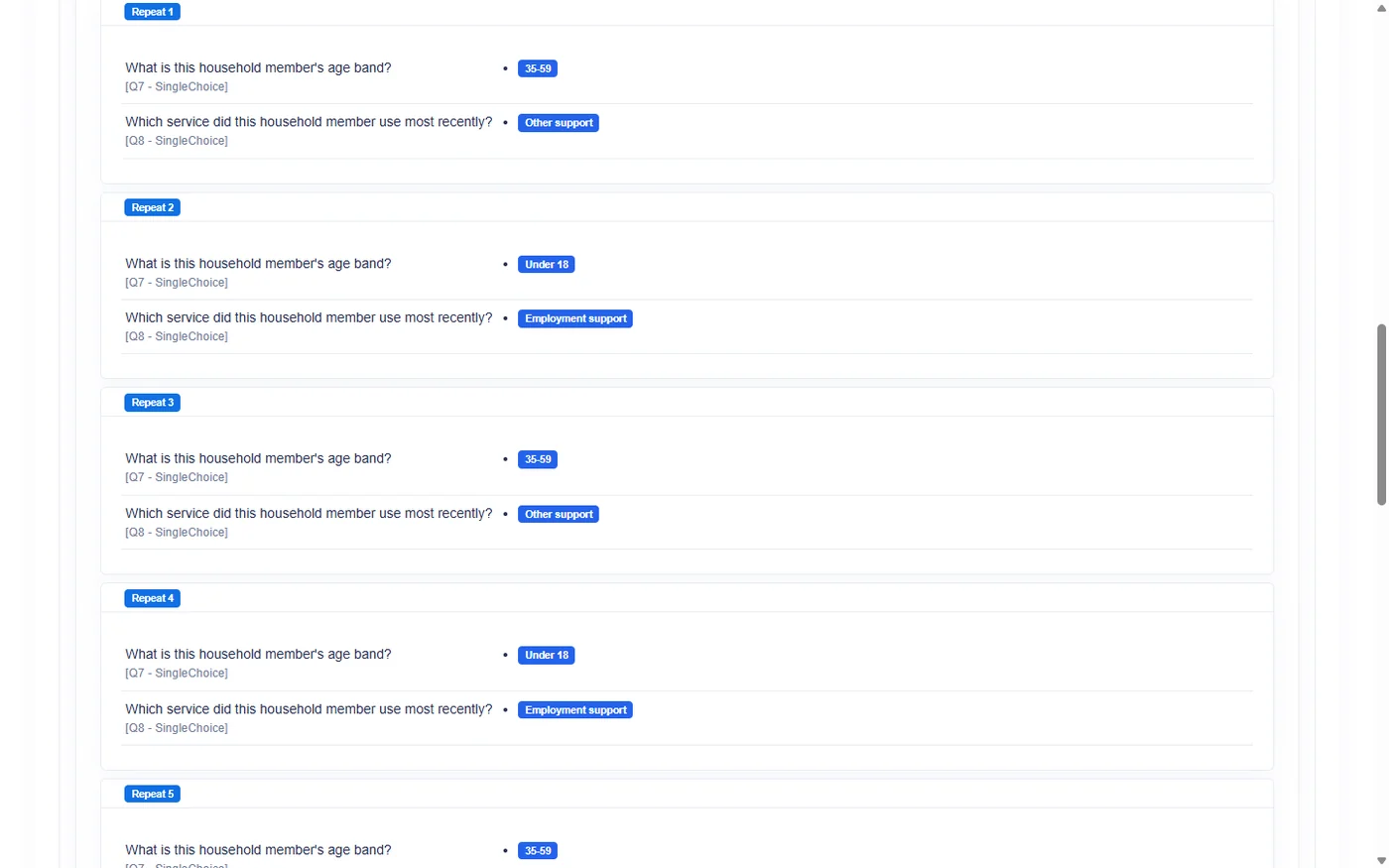
Design guidance
- Ask for the count before the content it controls.
- Use wording that makes a whole-number answer natural.
- Explain whether zero is a legitimate answer.
- Keep repeated groups focused; a very long repeated block increases interview burden.
- Use clear labels so occurrence numbers have context.
- Test correction behavior because field counts are often revised during an interview.
Repetition changes the structure of each response. Confirm the intended review and export layout before field collection begins.