
Question types
Question type determines what a respondent can enter, how Survanta validates the answer, and how the answer can be used by conditions and analysis. Select a type from the meaning of the data, not only from the desired appearance.
Survanta has 13 question types.
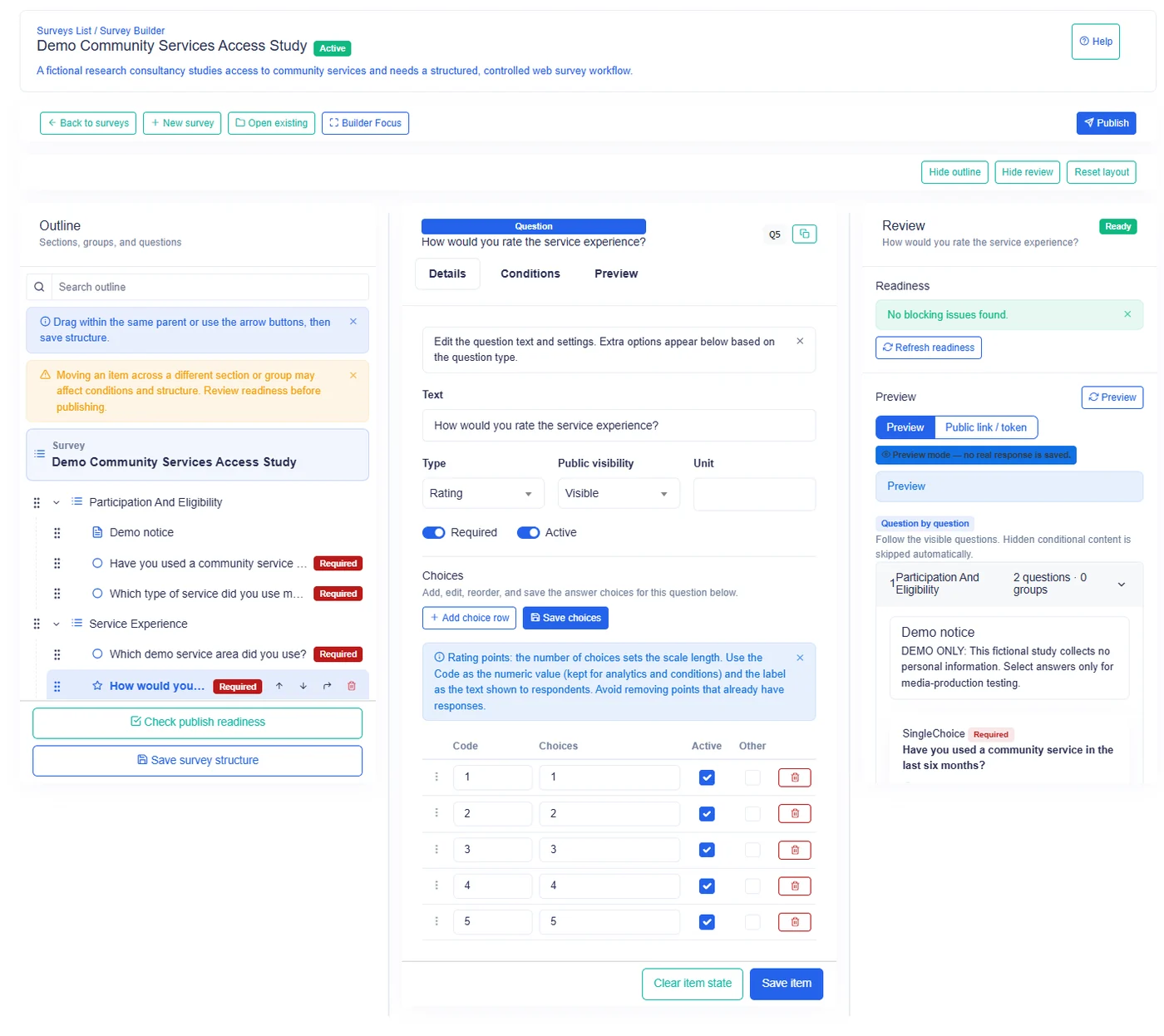
Quick reference
| Question type | Captures | Type-specific authored validation |
|---|---|---|
| Text | Short or long written answer | Minimum and maximum length |
| Integer | Whole number | Minimum, maximum, and unit |
| Decimal | Number that may contain a fraction | Minimum, maximum, decimal places, and unit |
| Yes/No | One binary choice | Required only |
| Single Choice | One option from authored choices | Required only |
| Multiple Choice | One or more authored choices | Required only |
| Rating | One rating value | Required only |
| Date | Calendar date | Earliest and latest date |
| Duration | Time duration | Required only |
| File | One or more uploaded files | File size, file count, and allowed file types |
| Lookup | One item from a managed dataset | Required only |
| Cascading Lookup | One narrowed item based on a previous lookup | Required only |
| Multi Lookup | Several items from a managed dataset | Required only |
The Required rule is available across all types. The table lists additional authored validation that is specific to a type. Lookup selection limits are lookup settings rather than general validation fields.
Text
What it captures: a written answer. The author can choose a short or long text input presentation.
Typical use: a respondent's explanation, observation, name, reference, or comment.
Important settings: short or long text mode, minimum answer length, and maximum answer length.
Validation: Required, minimum text length, and maximum text length.
Notable behavior: spaces alone do not satisfy a required answer. Apply a minimum only when the protocol needs meaningful detail; otherwise optional short comments can become unnecessarily difficult to submit.
Integer
What it captures: a whole number without a fractional part.
Typical use: household size, number of visits, age in completed years, or count of facilities.
Important settings: numeric minimum, numeric maximum, and a display unit for reporting.
Validation: Required, minimum numeric value, and maximum numeric value.
Notable behavior: Integer is the required source type for Count From Answer repetition and Dynamic Table Row Count Control. A fractional value is not accepted.
Decimal
What it captures: a number that may contain a fractional part.
Typical use: weight, distance, area, expenditure, or a measured percentage.
Important settings: numeric minimum, numeric maximum, decimal places, and display unit.
Validation: Required, minimum numeric value, maximum numeric value, and decimal places.
Notable behavior: decimal places control accepted precision. Use Integer instead when fractions have no meaning, especially for people, visits, or other counts.
Yes/No
What it captures: one answer from two alternatives.
Typical use: consent obtained, service received, asset present, or follow-up needed.
Important settings: the displayed choices and whether the answer is required.
Validation: Required.
Notable behavior: a selected negative response is still a complete answer. Conditions can use that answer to show or hide a follow-up branch.
Single Choice
What it captures: exactly one option from choices authored on the question.
Typical use: primary water source, employment status, region category, or highest education level.
Important settings: choice labels, order, active state, and any supported other-answer behavior.
Validation: Required.
Notable behavior: use Single Choice only when options are mutually exclusive. If several options may all be true, use Multiple Choice.
Multiple Choice
What it captures: one or more options from choices authored on the question.
Typical use: services used, livelihood activities, observed issues, or languages spoken.
Important settings: choice labels, order, active state, and any supported other-answer behavior.
Validation: Required.
Notable behavior: all selected options belong to one answer. Do not split a coherent multi-select list into many Yes/No questions unless each item needs its own logic or explanation.
Rating
What it captures: one numeric rating presented as a rating choice.
Typical use: satisfaction, severity, quality, confidence, or agreement.
Important settings: the rating choices presented to the respondent and whether the answer is required.
Validation: Required.
Notable behavior: current submission validation accepts rating values from 1 through 6. Keep the authored rating choices within that range. Choose labels whose direction is clear, such as low to high, and explain the meaning of the endpoints so different respondents interpret the scale consistently.
Date
What it captures: a calendar date.
Typical use: interview date, birth date, service date, inspection date, or expected completion date.
Important settings: earliest allowed date and latest allowed date.
Validation: Required, earliest date, and latest date.
Notable behavior: the boundary dates are valid values. Use date bounds to prevent impossible chronology, not to infer information that should be asked directly.
Duration
What it captures: a time duration in hours and minutes.
Typical use: travel time, waiting time, interview duration, or service interruption length.
Important settings: whether the answer is required and clear wording about the expected duration.
Validation: Required.
Notable behavior: the accepted representation uses hours and minutes in HH:mm form, from 00:00 through
23:59. If the study needs a period longer than that range, use a numeric question with an explicit unit.
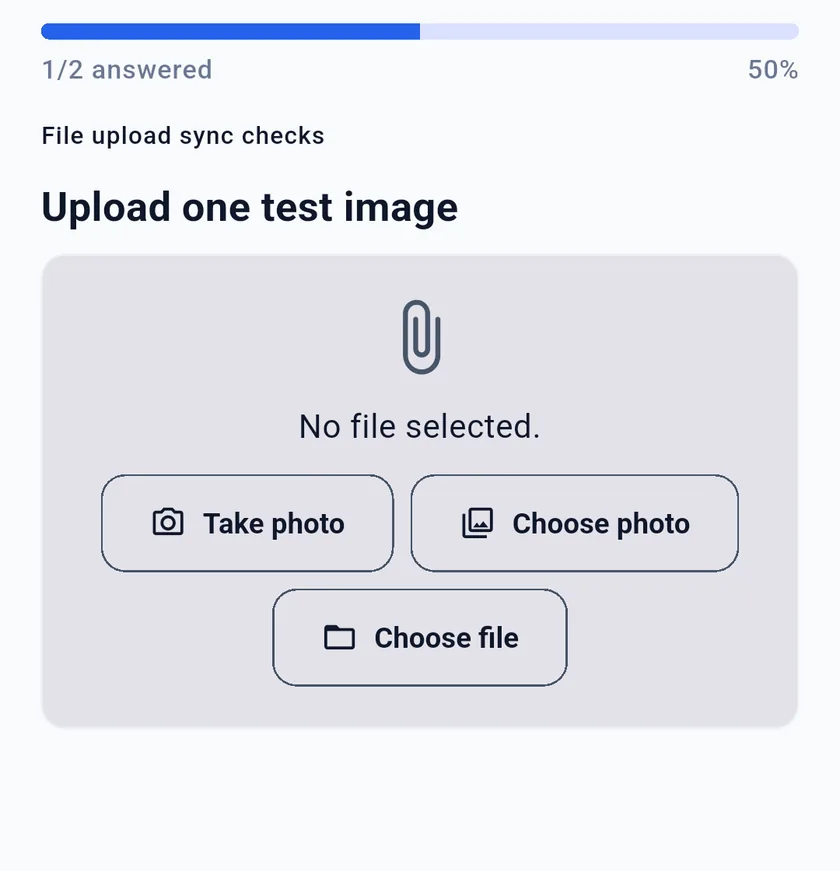
File
What it captures: one or more uploaded files.
Typical use: supporting evidence, supporting documents, field photographs, or scanned records when the study protocol permits collection.
Important settings: maximum size per file, maximum number of files, and allowed file types.
Validation: Required, maximum file size, maximum number of files, and allowed file types.
Notable behavior: the effective file-size allowance can also be constrained by platform and subscription limits. Collect only files that are necessary and authorized by the organization's data policy.
Lookup
What it captures: one item from a managed dataset.
Typical use: a facility, administrative area, program, partner, product, or other reference value reused across surveys.
Important settings: the managed dataset and whether only active items are offered.
Validation: Required.
Notable behavior: options come from the selected managed dataset rather than being typed into the question. This supports consistent reference values across several surveys.
Cascading Lookup
What it captures: one child item narrowed by an answer to a preceding lookup question.
Typical use: select a district after selecting a region, or select a facility after selecting an area.
Important settings: the question this list depends on. Choose that first — the dataset is then derived from it automatically and shown read-only, so a cascading question can never be pointed at a different dataset than its parent. A mismatch is rejected by the server even if it is submitted directly.
Validation: Required.
Notable behavior: the previous lookup choice narrows the next set of choices. Place the parent question before the cascading question and test every branch represented in the dataset hierarchy.
Multi Lookup
What it captures: several items from one managed dataset.
Typical use: several facilities visited, several programs supported, or multiple geographic areas covered.
Important settings: the managed dataset, whether only active items are offered, and the maximum selections when one is configured.
Validation: Required.
Notable behavior: use this instead of Multiple Choice when the values are centrally managed reference data rather than choices maintained inside one survey question.
Authored choices or managed datasets
| Need | Use |
|---|---|
| Options belong only to this question | Single Choice or Multiple Choice |
| One reusable managed reference value | Lookup |
| A child value depends on an earlier reference choice | Cascading Lookup |
| Several reusable managed reference values | Multi Lookup |
Lookup questions reduce duplicate maintenance when the same list is reused. Authored choices remain suitable for a short, survey-specific list whose wording belongs to that questionnaire.
Choosing safely
- Use Integer for whole-number counts that may control repetition.
- Use Decimal only when fractional values are meaningful.
- Use a unit to clarify numeric values in reports and exports.
- Use Date rather than Text for dates that require date validation.
- Use File only when attachments are necessary for the study.
- Use lookups when reference values are governed as a shared dataset.
- Preview the question in each intended collection channel.
Changing a question type can change the meaning and valid shape of its answers. Confirm the data model and reporting need before making that change to an established survey.