
Controlling table rows from an answer
Dynamic Table Row Count Control creates one table whose number of rows comes from a respondent's whole-number answer. It is a cardinality operator in the conditions system and uses the Repetition action.
Use it when the respondent first states how many records exist and should then receive exactly that many table rows.
The core model
The rule is:
Integer source question → Dynamic Table Row Count Control → Repetition action → Dynamic Table target
Example:
The answer to How many children? determines the number of rows in the Children table.
If the answer is 5, Survanta presents one Children table with five rows.
Authoring preconditions
Before adding the row-count condition, the target table must meet all three requirements:
| Requirement | Required setting | Why it matters |
|---|---|---|
| Rows can be created | Allow adding rows is enabled | The controller must be able to materialize the calculated rows |
| No authored row floor | Minimum rows is 0 |
The source answer becomes the row-count authority |
| Table is not independently required | Required is off | A valid source count of 0 must be possible |
The Survey Builder does not save the condition when these preconditions are not satisfied.
The source must be an Integer question. Other numeric or text question types cannot drive the row count.
Respondent behavior
When the source answer changes, Survanta recalculates the rows in the one target table.
- blank optional source: zero rows;
- source
0: zero rows; - source
1: one row; - source
5: five rows; - source above the applicable maximum: validation error.
While Row Count Control is active, manual row add and delete controls are locked. The source answer, rather than manual row operations, is the authority for the active row count.
Limits
Two maximums can apply:
- the dynamic table's authored maximum rows;
- the global cardinality maximum of 20.
The smaller applicable maximum wins.
Example:
- table maximum is
12; - global maximum is
20; - the source answer cannot create more than 12 rows.
Survanta does not silently turn an excessive answer into the maximum. The respondent must correct the source.
Required columns still apply
Row Count Control decides how many rows exist. It does not remove the validation configured on table columns.
If a required column exists, each active row must provide a valid value for that column before required-answer checks can pass. Text, numeric, date, choice, lookup, and file rules continue to apply to their cells.
Design the source wording and table columns together. A source count of five means the respondent must be ready to complete five records.
Exact comparison with table block repetition
The two features both use cardinality, but their results are structurally different.
| Feature | Number of table blocks | What the count creates |
|---|---|---|
| Dynamic Table Row Count Control | One | Rows inside the table |
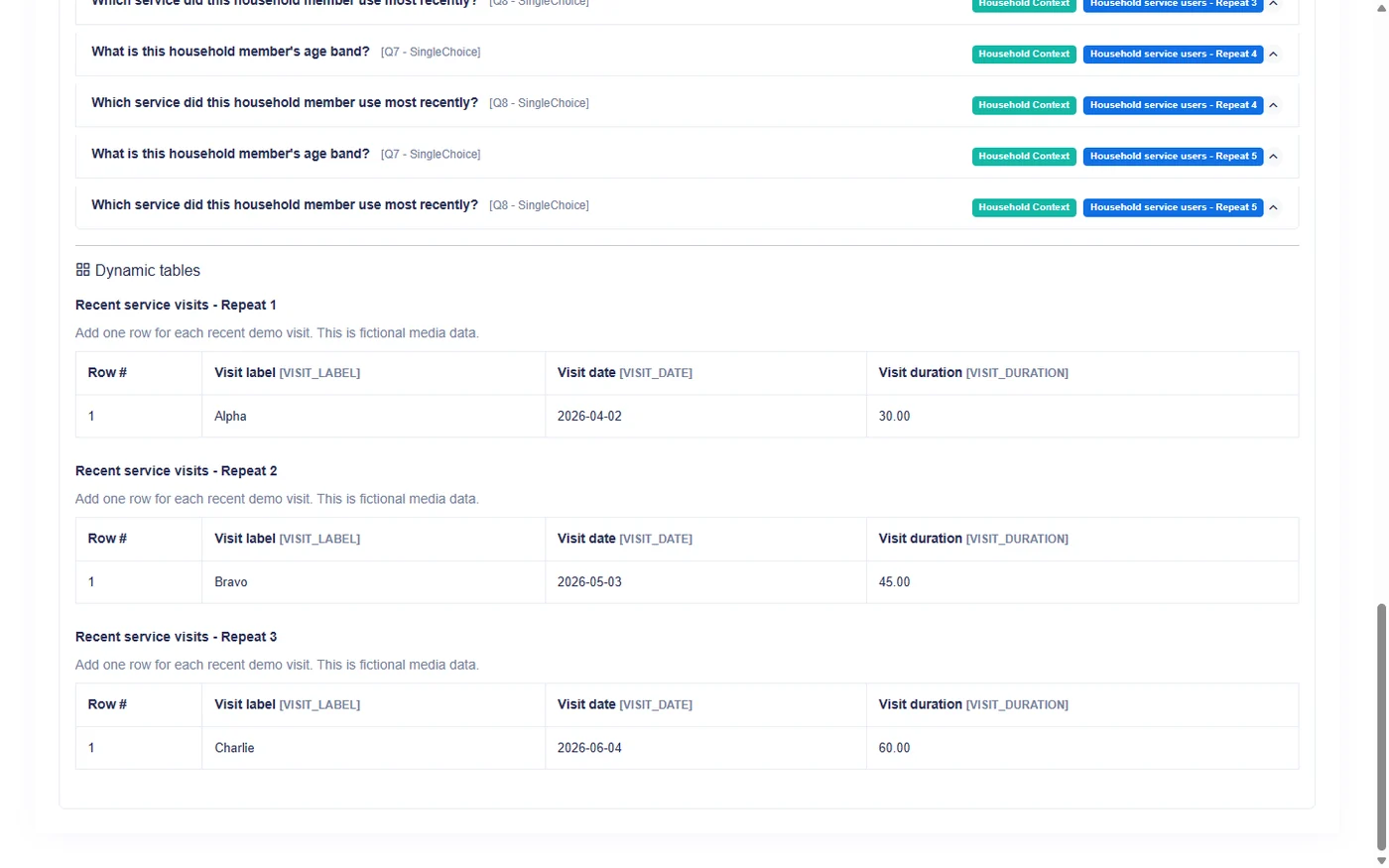
| Dynamic Table block repetition | Several | Separate tables, each with its own rows |
Required worked example
- "How many children?" = 5 → ONE table with five rows.
- Repeat table = 3 → THREE separate table blocks, each with its own rows.
The first design produces one list of five children.
The second design produces three independent table containers. Each container can hold its own set of rows.
Current combination limitation
Block repetition and Row Count Control describe different dimensions, but the current Survey Builder accepts only one active cardinality rule for a target table.
Authors cannot currently configure both rules on the same table. Choose block repetition when several separate table containers are required. Choose Row Count Control when one table needs an answer-driven number of rows.
Worked design: household roster
Questions and target
- Add an Integer question: How many children live in this household?
- Add one Dynamic Table: Children.
- Add columns such as child identifier, age, and school attendance.
- Set the table minimum rows to
0. - Enable adding rows.
- Leave the table itself not required.
- Add a Repetition condition using Dynamic Table Row Count Control.
- Select the Integer question as source and the Children table as target.
Test cases
| Source answer | Expected table result |
|---|---|
| blank and optional | One table with zero rows |
| 0 | One table with zero rows |
| 1 | One table with one row |
| 5 | One table with five rows |
| Above the table or global maximum | Validation message; source must be corrected |
Changes after data entry
If the respondent lowers the source count, rows beyond the new count leave the active table. If the count rises again during the same form session, temporarily detached row controls may return with their entered values.
Only rows inside the final active count are submitted. Field teams should correct the source count before final review and confirm that every remaining row belongs to a real record.
Common mistakes
- Using a Decimal question as the source.
- Setting the table minimum above zero before adding the control.
- Marking the target table required.
- Disabling row addition before adding the control.
- Expecting the feature to create several table blocks.
- Setting a source value above the table maximum.
- Treating a blank optional source as one row instead of zero.
Authoring checklist
- Confirm the source is Integer.
- Confirm the table minimum is
0. - Confirm row addition is enabled.
- Confirm the table itself is not required.
- Set a table maximum suitable for the protocol.
- Add the Repetition action with Row Count Control.
- Test blank, zero, one, common, and maximum counts.
- Reduce and restore a count after entering row values.
- Confirm that no other active cardinality rule controls the same table.
- Review the saved response and export structure.
Row Count Control answers "How many rows belong in this one table?" Block repetition answers "How many separate copies of this table are needed?"