
Validation rules
Validation rules define the acceptable shape of an answer. They help respondents correct an answer while they are completing the survey and reduce avoidable cleaning after collection.
Rules should follow the research protocol. They should not be used to force an expected result or to exclude valid edge cases without a documented reason.
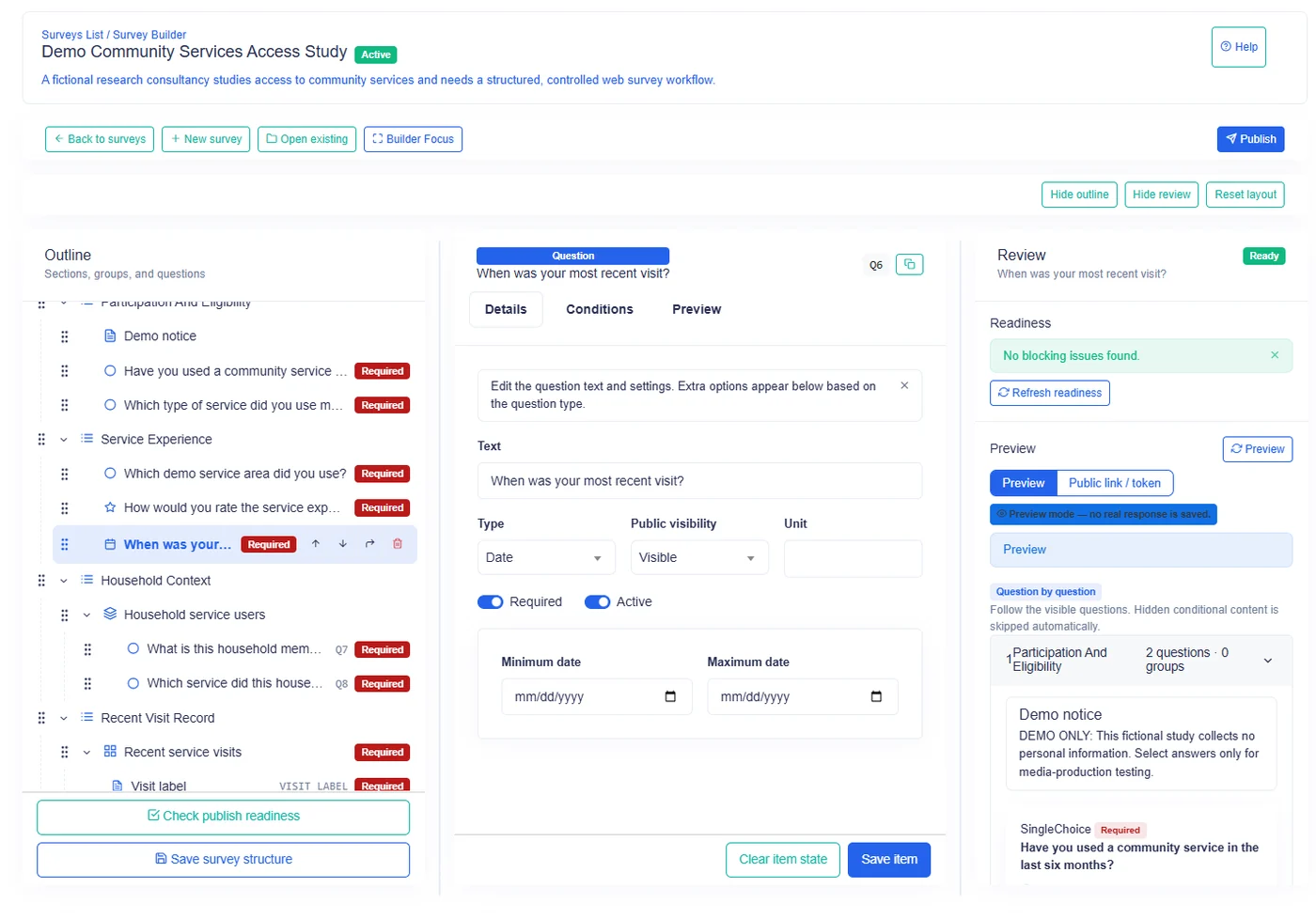
Available authored validation
Survanta supports these question-level validation capabilities:
- required answer;
- minimum text length;
- maximum text length;
- minimum numeric value;
- maximum numeric value;
- decimal places;
- numeric display unit;
- earliest date;
- latest date;
- maximum file size;
- maximum number of files;
- allowed file types.
The Survey Builder shows the settings relevant to the selected question type.
Validation by question type
| Question type | Required | Text length | Numeric range | Decimal places | Unit | Date range | File rules |
|---|---|---|---|---|---|---|---|
| Text | Yes | Yes | No | No | No | No | No |
| Integer | Yes | No | Yes | No | Yes | No | No |
| Decimal | Yes | No | Yes | Yes | Yes | No | No |
| Yes/No | Yes | No | No | No | No | No | No |
| Single Choice | Yes | No | No | No | No | No | No |
| Multiple Choice | Yes | No | No | No | No | No | No |
| Rating | Yes | No | No | No | No | No | No |
| Date | Yes | No | No | No | No | Yes | No |
| Duration | Yes | No | No | No | No | No | No |
| File | Yes | No | No | No | No | No | Yes |
| Lookup | Yes | No | No | No | No | No | No |
| Cascading Lookup | Yes | No | No | No | No | No | No |
| Multi Lookup | Yes | No | No | No | No | No | No |
Lookup configuration may include selection behavior, but those settings are separate from the authored validation fields covered on this page.
Rating also has a built-in submission range of 1 through 6. This is not an authored validation field, so keep the rating choices within that accepted range.
Required
Required means the respondent must provide an applicable answer before the response can satisfy required-answer checks.
Required applies to every question type. A valid answer depends on type:
- Text and Duration need a non-blank value.
- Integer, Decimal, and Rating need a numeric value; zero is still an answer where otherwise valid.
- Date needs a date.
- Yes/No, Single Choice, and Multiple Choice need a selection.
- File needs at least one current file.
- Lookup types need at least one selected dataset item.
Conditional logic changes applicability. A required question that is hidden or disabled is not treated as an unanswered active question.
Minimum text length
Minimum text length applies only to Text questions. It sets the fewest characters accepted when the respondent provides an answer.
Use it for answers that genuinely need detail, such as an incident description. Avoid using a large minimum for names, codes, or short comments.
The minimum cannot be negative and cannot exceed the configured maximum.
Maximum text length
Maximum text length applies only to Text questions. It limits the number of characters that can be submitted.
Choose a limit that accommodates legitimate answers. The platform can impose an upper ceiling, so the effective maximum may be lower than a value retained in an existing survey setting.
Short and long text presentation can have different starting defaults, but the authored maximum remains the rule that matters to the answer.
Minimum and maximum numeric values
Numeric bounds apply to Integer and Decimal questions.
- Minimum rejects a value below the lower boundary.
- Maximum rejects a value above the upper boundary.
- A value equal to either boundary is accepted.
Use a minimum of zero when negative values have no meaning. Do not set a maximum from an expected average; set it only when values above it are invalid for the measure.
The minimum cannot be greater than the maximum.
Decimal places
Decimal places apply only to Decimal questions. They limit the accepted fractional precision.
Examples:
| Setting | Suitable answer examples | Rejected example |
|---|---|---|
| 0 | 12, 105 |
12.5 |
| 1 | 12.5, 0.3 |
12.55 |
| 2 | 12.55, 0.25 |
12.555 |
The authored range is zero to two decimal places. Use the precision of the real measurement process. Additional digits do not improve data quality when the instrument cannot measure them.
Unit
Unit applies to Integer and Decimal questions. It is a display and reporting label such as kilograms, hours, points, or local currency.
The unit clarifies meaning but does not convert values. If one team records kilograms and another records grams, use separate questions or a shared protocol rather than expecting the label to transform the answer.
Earliest and latest date
Date bounds apply only to Date questions.
- Earliest date prevents dates before the accepted period.
- Latest date prevents dates after the accepted period.
- The boundary dates themselves are accepted.
The earliest date cannot be later than the latest date.
Consider whether a fixed date will age poorly. For a long-running survey, a question such as birth date may need a carefully maintained bound rather than a narrow temporary window.
Maximum file size
Maximum file size applies only to File questions and limits each uploaded file.
The effective allowance can be narrowed by platform settings and the organization's subscription. The interface shows the currently allowed authoring ceiling.
Set a smaller maximum when field connectivity or device storage makes large uploads impractical, while preserving enough quality for the evidence being collected.
Maximum number of files
Maximum number of files applies only to File questions. It limits how many current files can belong to one answer.
The value must be at least one. A platform ceiling also applies.
Ask for one file when one piece of evidence is sufficient. Raise the count only when the protocol requires several views or documents.
Allowed file types
Allowed file types apply only to File questions. The author selects from file types currently available in the platform catalog.
Allow only formats that the organization can review and retain. A narrower list can reduce unsupported or unexpected submissions, but it must still cover the devices and tools used by field teams.
At least one allowed type is needed for a usable File question.
What the respondent sees
When an entered value does not satisfy a rule, the respondent receives a validation message and must correct the active answer before the relevant completion or submission check can pass.
Typical messages identify the applicable boundary, such as:
- the minimum or maximum text length;
- the accepted numeric range;
- the maximum decimal precision;
- the earliest or latest date;
- the file count or upload restriction.
Hidden or disabled content is not treated as answered and does not block the respondent as an active required item.
Practical rule design
- Start with the real domain constraint.
- Confirm whether the boundary is inclusive.
- Test values below, at, and above each boundary.
- Test blank optional answers separately from required answers.
- Test the rule in every intended collection channel.
- Recheck file limits under field connectivity conditions.
- Review whether conditional hiding changes which required rules apply.
A validation rule should explain a true data requirement. If respondents routinely need exceptions, revise the question or protocol rather than training teams to enter placeholder values.