
Notes and current limitations
This page records what the mobile app does not do today, so you can plan around it. It is kept honest deliberately: if something is not listed as supported here, do not assume it works.
Needs a connection
- Signing in.
- Downloading a survey for the first time, and refreshing a device copy.
- Opening a public survey link or a portal link. These are online-only; they are not stored for offline use.
Synchronisation timing
Queued responses are sent when the app starts and when it returns to the foreground. A queued response may therefore not upload the moment the network returns — reopening the app sends it.
When a submission is refused
The server can refuse a submission for a business reason even though the network call itself succeeded, for example when a survey requires a location you have not captured. The sync queue shows the reason on the queue entry, and offers Retry where retrying can actually help.
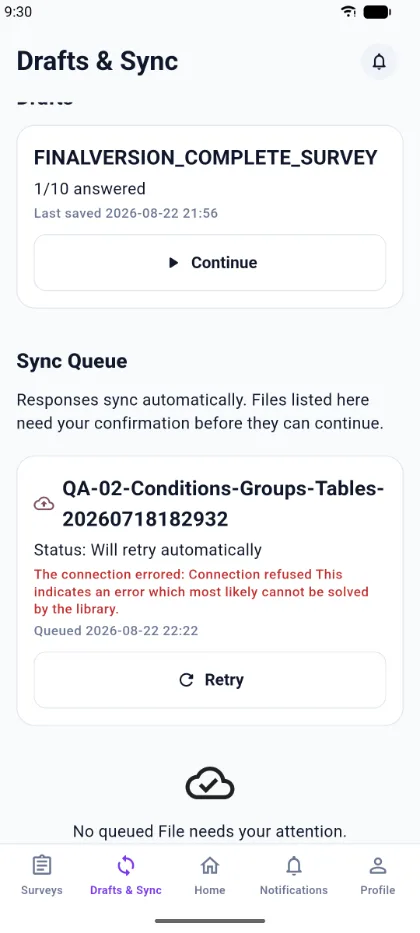
A response that was frozen for sending before this behaviour existed cannot be rewritten safely, so an older failed entry may stay in the queue without a retry option.
Surveys that require a location
If a survey is restricted to a location, you must capture your location before submitting, and you must be within the area the survey defines. The review screen tells you when location is required.
Files
A response uploads on its own; a queued file may need you to confirm it before it is sent.
Repeating groups driven by a count
A survey author can configure a repeating group whose number of repetitions is driven by an answer. That particular configuration is not applied by the mobile app yet. Repeating groups themselves work normally; it is only the count-driven variant that is unsupported. Avoid it for mobile data collection until this page says otherwise.
Not available in the app
- Authoring or editing surveys. Surveys are created on the web dashboard.
- Analytics, charts, and exports.