
Validation and review
While you answer
Required questions are marked Required. The app does not block you from moving on when one is empty — it lets you keep going and shows a notice instead:
This question is required. You can return to complete it before submitting.
That is deliberate. In the field it is often easier to keep moving and come back, so nothing is lost if one answer is not available yet.
Field-level rules apply as you type — text length counters, numeric ranges, decimal places, and date bounds all follow what the survey author configured.
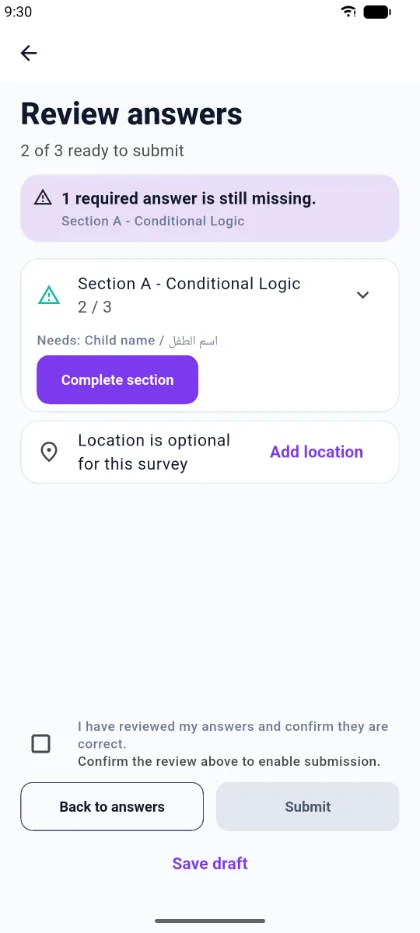
The review screen
Review answers is the checkpoint before you submit. It shows:
- how many answers are ready — for example 2 of 3 ready to submit;
- how many required answers are still missing;
- a card per section with its completion count, and, when something is missing, the exact question names under Needs:;
- Complete section, which takes you straight back to the missing question;
- whether location is required for this survey;
- a confirmation checkbox you tick to say you have reviewed your answers.
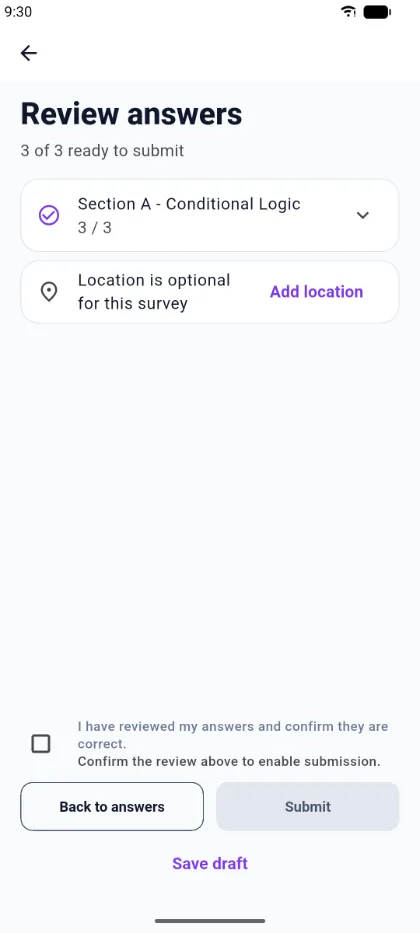
Once everything required is present the summary reads N of N ready to submit and every section shows a completed check.
Submitting
Tick the confirmation and choose Submit. On success the app confirms:
Your response has been submitted.
If you are offline, the response is queued instead — see Working offline.