
Conditional questions
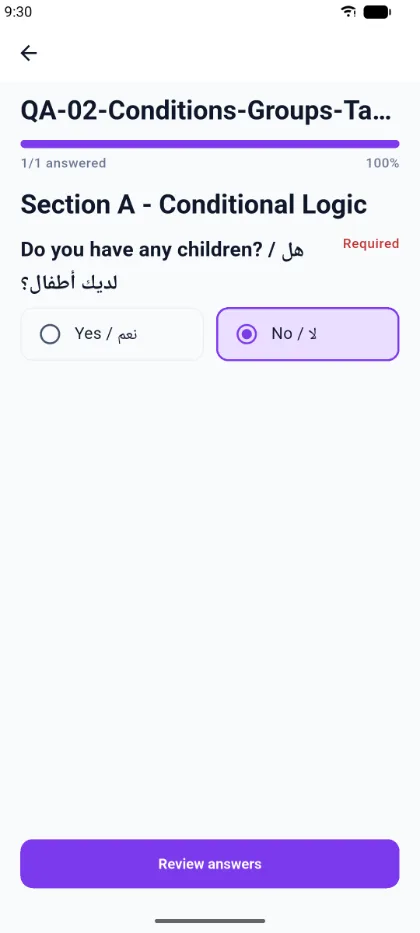
Surveys rarely ask everyone the same thing. A survey author can attach conditions so that parts of the survey appear only when they are relevant, and the mobile app applies those rules as you answer.
What you see
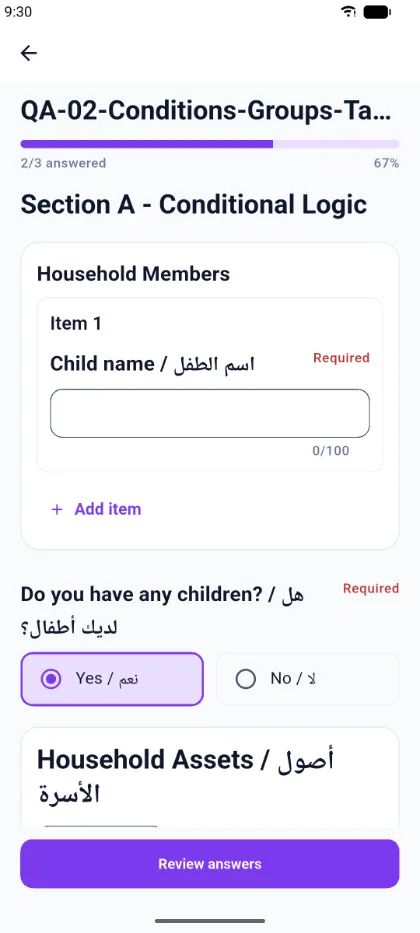
When you change an answer that other content depends on, the survey updates immediately. Content that is no longer relevant disappears; content that has become relevant appears in place.
What a condition can control
A condition can show or hide:
- a single question;
- a whole group of questions, including a repeating group;
- a section;
- a dynamic table.
How this affects your progress
The progress counter follows the questions that are actually active for you. Answering in a way that hides a branch lowers the total — a survey can move from 3/3 answered to 1/1 answered — because the hidden questions are genuinely not required of you.
Changing your mind
If you change an answer in a way that hides content you already filled in, the app warns you that some answers you have already given will be hidden or disabled. Switching back restores the branch with your earlier answers still in place, so an accidental tap does not lose your work.
Hidden answers and submission
Answers on a branch that is hidden at the time you submit are not counted against you and are not sent as active answers. Only what the survey logic says applies to you is submitted.