
Mobile Offline Work and Operations
How queued responses, file uploads, field tasks, and review steps behave when a subscription expires mid-collection — and how they recover.
Offline responses across an expiry
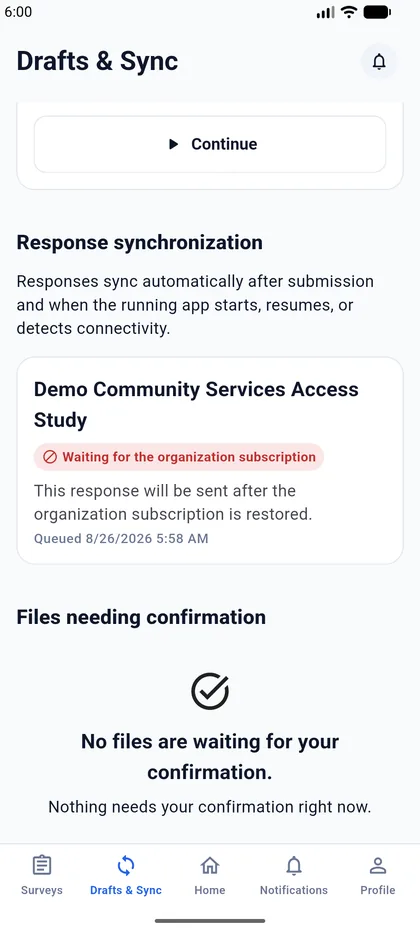
This is the scenario field teams hit most often: a survey is downloaded while the subscription is healthy, responses are collected in the field, and by the time the device reconnects the organization's subscription has lapsed.
The guarantee: no collected work is lost.
The verified sequence:
- The device downloads the survey while the subscription is active.
- Responses are captured offline. Each queued item carries its
SurveyVersionId, its content hash where applicable, its answers, and aclientSubmissionId. - The subscription expires.
- The device reconnects and tries to sync.
- The server refuses with
errorCode 1001/SubscriptionExpired. - The server creates no response, no answers, no field task completion — and it does not consume the idempotency key.
- The organization renews.
- The device retries the identical payload.
- The server accepts it and saves it exactly once.
- Any further retry of the same payload returns the canonical "already accepted" result with the same response identifier. No duplicate is created.
The idempotency key
The key for a response submission is clientSubmissionId.
It is not clientUploadId. That is the separate retry key for file uploads, a different operation with its own rules. Confusing the two produces either duplicated responses or lost uploads.
Client rules on 1001
Do:
- keep the queued item
- keep the same
clientSubmissionId - keep the original
SurveyVersionId, content hash, and answers exactly as captured - back off and stop automatic retries
- show a "renewal required" state
- retry the identical payload once service is restored
Do not:
- delete or discard the queued item
- mark it as successfully synced
- generate a new
clientSubmissionId - rebuild or re-serialize the payload
- sign the user out
A SubscriptionExpired result is retryable and non-destructive. It is not a validation failure, and it must never be treated like one.
File uploads
| Situation | Result |
|---|---|
| Active, allowed file type | Upload succeeds; one file record and one stored file |
| Expired, token issued before expiry | Refused with 1001 — no file record, no stored file |
| Expired, freshly issued token | Refused with 1001 — no file record, no stored file |
| After renewal, same pre-expiry token | Upload succeeds immediately |
A refused upload leaves nothing behind in either direction: no database record without a file, and no file without a record.
File problems and subscription problems stay separate. An unsupported file type, a corrupt file whose contents do not match its declared type, a question that does not accept files, or a survey belonging to another organization are all refused on their own merits, with their own error codes — never as SubscriptionExpired. Equally, a genuine expiry is never reported as a file problem. A client must not present a rejected upload as successful.
Field tasks
| Situation | List and read | Completion |
|---|---|---|
| Active | Assigned tasks are visible | Completes, with the correct time and actor recorded |
| Active, but the task belongs to another collector | Refused; the task is not disclosed | Not applicable |
| Expired | Refused with 1001 |
Refused with 1001 |
| After renewal | Visible again | Completes normally |
The key guarantee: expiry can never leave a field task partly or wrongly completed. A refused attempt does not set the completion flag, does not stamp a completion time, and does not record an actor. The task simply stays open until service resumes.
Assignment and organization boundaries are unaffected by subscription state. A collector who is not assigned a task is refused whether the subscription is active or not, and learns nothing about the task either way.
Review workflow
The review chain is:
Submit for review → Start review → Return for correction → Resubmit → Start review → Approve
| Situation | Behaviour |
|---|---|
| Active | The full chain works. Approval completes the response. |
| Expired | Every transition is refused with 1001, approval included. |
| After renewal | Valid transitions resume, continuing from the exact state the response was left in. |
Reviewer steps are gated just as collector steps are. This is deliberate: approval is the only way a review-workflow response reaches its completed state, so leaving reviewer actions open would let an expired organization finish collecting work through the review path — the precise outcome expiry exists to prevent.
Reading a response's current lifecycle state is not gated. You can always see where a response stands; you just cannot move it.
A refused transition leaves no partial step: no status change, no revision increase, no audit entry, and no field task completion.